Spring 2026 Resources Page

Flowers on Campus

Spring 2026 Course Resources

Actions to Take

Below are policies and guidance every instructor should address prior to the start of the term.

1. Make your Spring content digitally accessible

The Provost and ADA Coordinator recently asked all instructors to work towards digitally accessible courses.

Learn the basics of digital accessibility in the Digital Content Accessibility Training (especially the second module and the supplemental materials) and bookmark the "Basic Digital Accessibility" page for quick tips. 

Find resources for instructors, including an approach to applying those basics, Canvas-specific tools, and weekly drop-in Digital Accessibility Teaching Support Hours on the Digital Accessibility in Teaching page.

2. Refer students to academic advising 

Encourage students to connect with their advisor for help navigating resources, exploring majors, or making decisions about withdrawals or grading option changes (graded to pass/no pass). If you notice a student hasn’t attended or is newly disengaged in your class, please reach out directly to the student to offer support. You can also help alert advising if students don’t show up for classes or eventually disengage by filling out the Faculty & Staff Referral Outreach Form.

3. Continue to consider your AI policies and practices

Consider taking the updated, shortened version of the GenAI Policy and Assignment Design Self-Check Tool. It takes 8–10 minutes to complete. No personal data are collected, and you’ll receive customized suggestions based on your responses. 

All instructors should have an explicit policy about GenAI in their course syllabus. Find sample GenAI policy language in our Artificial Intelligence Resource Guide and in our Syllabus "Starter."

UO Information Services reminds all faculty, staff, and students that Microsoft Copilot with Data Protection is currently your most secure option for generative AI. Learn more at Getting Started with Microsoft Copilot with Data Protection in the UO Service Portal. 

study spot at lillis hall
Preparing your Canvas Course

If you are preparing to teach a course again that you taught in the past, you do not need to start from scratch: you can easily import your materials from a prior Canvas course. Below are instructions for how you can copy a whole course, a single item, and your recorded videos:  

Please note that Panopto videos must be copied to the new course site to ensure student access.  

professor teaching class

Ready-to-go Resources


Below, you can find our Syllabus Essentials Guide, Canvas Course Templates, Welcome Module, Report Absences module, and Academic Integrity module. You also will see descriptions of each resource, so you can identify which might best fit your needs and context. Links will take you to the relevant webpage and Canvas Commons modules, where you can explore, import, and adapt them for your courses!

►  Syllabus Essentials
►  Canvas Course Templates

And
log into Canvas with your DuckID to view:

  • Course Welcome Module​​​​​​
  • Report Absences Here Module
  • Ducks Have Integrity Module
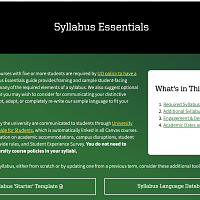
Syllabus Essentials Page Screenshot

Syllabus Essentials (webpage & Word document)

This  Syllabus Essentials Guide provides framing and student-facing policy language for all required syllabus elements as well as other sections that you may wish to consider in crafting and communicating your distinctive course policies. The webpage for this resource also features a downloadable and accessible Word document version.

Visit the Syllabus Essentials Guide


Canvas Course Templates text over image of multiple people at computer

Canvas Course Templates (New!)

Canvas course templates are designed to save you time, ensure consistency, and incorporate best practices in instructional design and accessibility. Whether you’re teaching online, hybrid, or in-person, UO Online's Canvas course templates offer a flexible and structured approach to course design..

Read about and use the Templates


thumbnail of Canvas Commons "Welcome module"; above title are icons for TEP & UO Online

Course Welcome Module (Canvas)

This customizable module orients students to the organization and content of the course. It supports clearer course navigation—a need many students identified last year. It also features opportunities for you to introduce yourself to students, for students to introduce themselves to one another, and for students to easily find both academic and non-academic supports on campus.

Explore the Welcome Module


thumbnail of Canvas Commons "Report Absences Here" module; above title are icons for TEP & UO Online

Report Absences Here (Canvas Module)

This module directs student communications about absences to a single place in Canvas. Weekly absence surveys (a) link to key course and UO policy, (b) ask students to identify both the week's absence and total absences (to encourage their awareness of where they fall in the policy), (c) include weekly highlighted "UO dates to know," featuring supportive student resources/events, as well as any relevant academic deadlines for things like withdrawing from or adding a class, and (d) ask students to answer several questions about how they plan to keep up with the course, to activate their agency in planning and decision-making.

The surveys are designed not to require responses from faculty; they direct students who wish to receive support in the course—support unrelated to the absence and makeup policy—to email the instructor.

Find the Report Absences Here Module


Thumbnail of Canvas module titled "Ducks Have Integrity" with green background, yellow hand holding leaf

Academic Integrity (Canvas Module)

This customizable module engages students with questions around what academic integrity is and why it matters—both to UO, and to them. Students who entered UO in the last two years will have taken a detailed Academic Integrity module as part of IntroDUCKtion (a module made by the same collaborators who created this one). Adding "Academic Integrity" to your course and customizing it for your context can help strengthen and refresh that initial guidance for students.

This module has been updated with brief guidance for students around generative AI, the importance of understanding each instructor's policy on whether generative AI has a appropriate role in the work of the class, and information about the risks of using it inappropriately.

Get the Module in Canvas Commons

Spring 2026 Dates & Deadlines

  •  

    april 4

    Last day to drop classes without a "W"

  •  

    april 6

    Last day to add a class via DuckWeb 

  •  

    May 17

    Last day to withdraw from a class

  • may 25

    Memorial Day holiday; classes not in session

  •  

    may 27 - june 8

    End-of-Term Student Experience survey is open

  •  

    june 5

    Last day to change grade options (graded or P/N)

  •  

    june 12

    Last day for students to request an Incomplete. Students must submit the request by 5 p.m. on the Incomplete Policy page. 

  •  

    june 16

    Deadline for instructors to submit grades

Resource Goals

Each term, TEP and UO Online update this page and its component resources, created to support you as you prepare your courses. We hope that reading timely information on any new university policies and practices, browsing ready-to-go resources that you can easily adapt, accessing concise guidance on things like rolling over Canvas courses, and noting key term dates will give you a boost and help you enjoy the start of term as much as we know your students will.

Let us know how else we can support you! As you approach the term, know we are available to connect with you on anything related to teaching and learning. Whether you have a brief, targeted question or are looking for co-thinking, how-tos, or feedback, we're here for you. Connect with us using our simple contact form.

All our best as you begin your term!