

Online Course Development Timeline
Partner with UO Online to design a high-quality, accessible online course—explore the timeline, milestones, and supports that guide every step of development.
Overview
This page brings together the core resources that support online course development. It complements the Online Course Development Checklist, which outlines what to do in each phase and complements the course development timeline, which shows when key phases and milestones typically begin.
Together, these tools offer a clear picture of the development process and help faculty plan their work, stay on track, and access support when they need it.
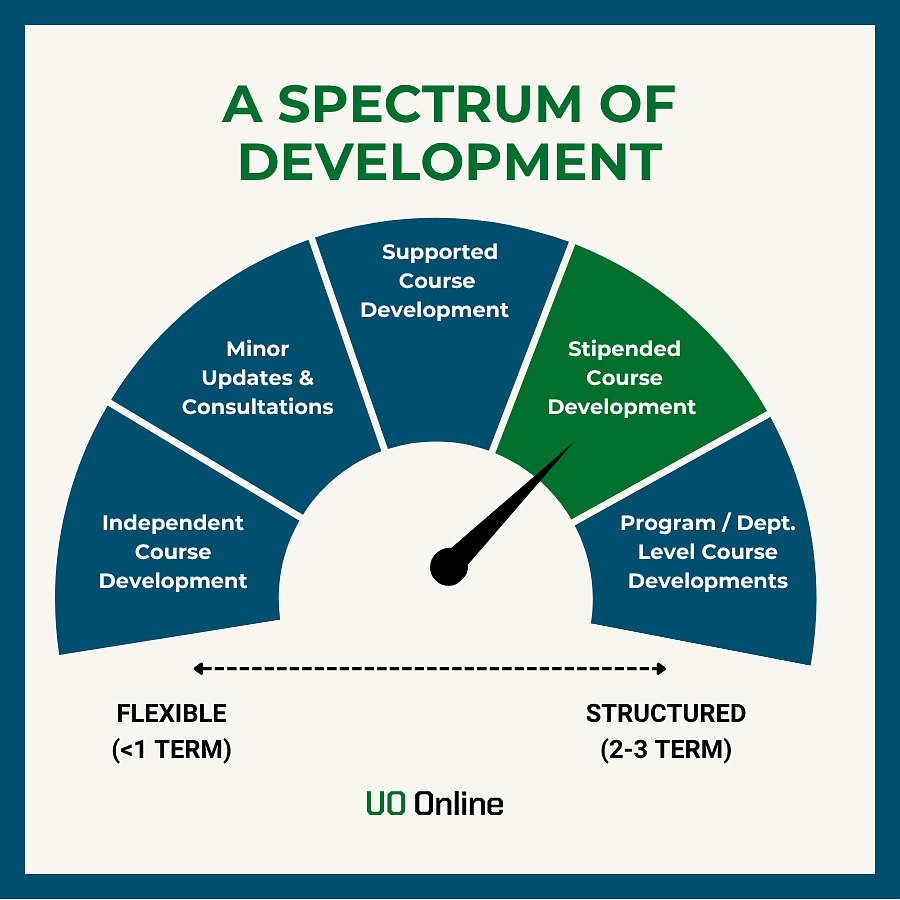
This resource is designed for faculty developing async. courses. It offers structure, sample timelines, and flexible entry points to help instructors plan their work and collaborate effectively with UO Online. While the two- to three-term timeline represents UO Online’s recommended model for a full course development, flexible milestones are included for faculty on shorter or self-paced schedules.
Some online course projects qualify for UO Online’s stipend-supported development. Those projects follow this timeline with added structure and regular ID collaboration. See the stipend-supported development section below for details.
Timeline at a Glance
Each course development pathway represents a collaborative partnership with UO Online. Whether you’re developing a new course, redesigning an existing one, or making quick updates, our team provides the level of support that fits your project’s scope and goals. Because online course development is a substantial undertaking, faculty often report spending 200+ hours on a new online course (University of Minnesota SPH, 2025). The timelines below are designed to support that workload while balancing quality, pacing, and flexibility. Not sure about a course development or support term on this page? See Defining Terms at the bottom of this page.
| Project Type | Recommended Timeline | Recommended Start | Spectrum Placement |
|---|---|---|---|
| Full course development | 2–3 terms (22–33 weeks) | 2–3 full terms before delivery | ● ● ● Structured |
| Major revisions / course re-development | 1–2 terms (11–22 weeks) | 1–2 terms before delivery | ● ● ○ Moderately Structure |
| Minor revisions & updates | <1 term (≤11 weeks) | 1 term before delivery | ● ○ ○ Flexible |
Stipend-Supported Opportunities
UO Online offers stipend-supported opportunities for faculty developing new online courses or undertaking major redesigns. These projects require unit approval and must align with departmental strategic goals. Faculty approved by UO Online for stipend support work closely with a UO Online Instructional Designers throughout the development process. To view eligibility details, proposal deadlines, and the full process, select “Stipend Criteria & Deadlines” to be redirected to that landing page.
Course Development Timeline
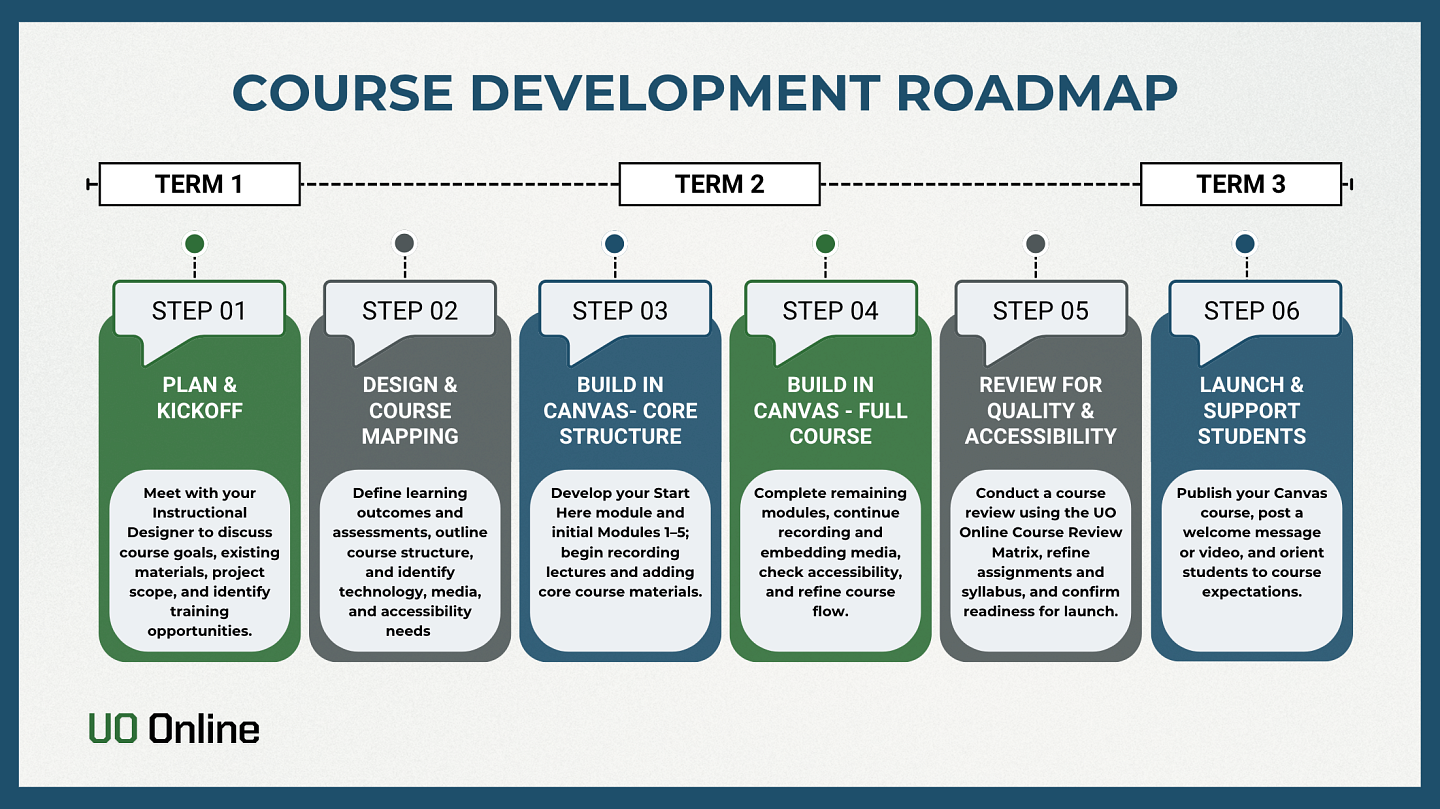
These six steps outline the recommended timeline for designing, building, and launching your online course. Use the overview to get the big picture; expand each step for a deeper dive and to see what UO Online recommends to be completed before moving on.
Step 1
Planning & Kickoff
Weeks 1-3
Meet with your Instructional Designer to discuss course goals, existing materials, and teaching context. Focus on Course scope, big-picture learning outcomes and assessments, and accessibility and technology considerations. Refer to the UO Online’s Course Development Checklist: Design Phase Parts 1-3 for specific tasks and materials for this phase. The checklist pairs with this timeline to help you track progress and stay organized throughout the development process.
Deeper dive into Step 1 (click to expand and see the full list of steps)
- Kick off with your Instructional designer (ID)
- Meet with your assigned ID and discuss course scope (new, redesign, update).
- Share course materials (e.g. syllabus, course schedule, learning objectives, rubrics, any existing student feedback or course evaluations, assessments & activities) and goals.
- Begin big-picture design conversations
- Discuss course arc, major outcomes, assessments, and alignment using backward design principles.
- Start preparing for course mapping in step 2.
- Identify and group/collaborative work expectations you want for your students.
- Identify accessibility, technology, and support needs and considerations
- Visit Digital Accessibility at UO for training and accessibility Guidelines
- Identify Multimedia or support resources needed
- Identify if proctoring is potentially desired
- Identify training opportunities and/or when to build these in, if needed:
- Developing an Online Course
- Preparing to Teach
- Canvas Basics + introduction to Canvas Support
- Universal Design for learning resources
- Have an initial conversation about the Course Review Matrix
- See the Online Course Development Checklist: Design Phase Parts 1–3 for detailed tasks related to course mapping, outcomes, alignment, and technology considerations.
Deliverables by the end of Step 1:
- Project Timeline (initial working version)
- Shared course materials (syllabus, schedule, rubrics, assessments, past feedback, etc.)
- Canvas Shell Create/Requested
- Notes from initial big-picture outcomes/assessment/alignment conversation to be used in Step 2
- Initial connection with Media and Proctoring Services (if those are identified).
Step 2
Timeline, Tools & Expectations
Weeks 4-5
Finalize development expectations and confirm necessary supports (training, multimedia, etc.). Outline deliverables and training needs such as Canvas Basics or Developing an Online Course. Refer to the Checklist Design & Build Phase Parts 3–4 to stay on track during setup.
Deeper dive into Step 2
- Finalize a development expectations
- Finalise a development timeline, roles, and expectations, and key deliverables.
- Determine training needs (e.g. Canvas basics, Developing an Online Course, Preparing to Teach an Online Course workshops, Universal Design for Learning).
- Identify technology and multimedia needs.
- Identify instructional tools and multimedia needs
- Schedule a consultation with Media Support if planning to use this service.
- Begin outlining your course structure
- Begin mapping modules, outcomes, and assessments.
- Identify any previous Canvas course materials that will be reused.
- Review the UO Online’s Course Planning Map resources and section located at the bottom of this webpage.
- Begin mapping modules, outcomes, and assessments.
- Refer to Checklist Design & Build Phase Parts 3–4 for detailed steps on technology selection, training preparation, Canvas shell setup, and early course mapping.
Deliverables by the end of Step 2:
- Agreed-upon development timeline and milestones.
- Draft course map outlining modules, outcomes, and major assessments.
- Preliminary list of tools, media, and external integrations.
Step 3
Course Design & Development
Weeks 6-17
Use the UO Online Course Development Checklist Build Phase Part 4-8 to stay on track as you build modules and prepare your course for review.
Phase 1: Weeks 6-11: Homepage, Start Here, and Modules 1–5
Develop your Start Here module and build core course content. Stipend-supported projects will complete full module structures; others may build selectively. Use the Basic Digital Content Accessibility Top Tips as you add content and media to ensure all materials meet UO accessibility and Universal Design for Learning (UDL) standards.
Deeper dive into Step 3: Phase 1
- Set up foundational (or core) course elements
- Develop or refine the Start Here module (use the template version or adapt/create your own).
- Decide on your course shell setup: either begin from a UO Online Canvas Course Template or start from a blank course shell.
- Build early modules (1-5)
- Build the module structure in Canvas for Modules 1–5.
- Add learning objectives, activities, readings, and assessments for Modules 1–5.
- Upload course materials and run accessibility checks using the Basic Digital Content Accessibility Top Tips
- Prepare instructional materials
- Draft or refine rubrics for assessments.
- Draft weekly/module announcements.
- Revisit course materials (syllabus, schedule, learning objectives, rubrics, past student feedback, assessments & activities) and goals to ensure consistency.
- ID conducts an initial course review once this content is in place.
- See Checklist Build Phase Parts 4–8 for specific tasks related to building modules, adding materials, linking assessments, creating rubrics, and ensuring accessibility.
Phase 2: Weeks 12-17: Modules 6–10 and the remainder of the course elements
Develop the remaining modules and build core course content. Stipend-supported projects will complete full module structures; others may build selectively.
Deeper dive into Step 3: Phase 2
- Build the remaining modules for the course
- Build the module structure in Canvas for Modules 6-10.
- Add learning objectives, activities, learning materials, and assessments for each module.
- Upload content and complete check accessibility.
- Prepare and refine instructional and assessment materials
- Draft or refine rubrics as needed.
- Draft weekly/module announcements.
- Finalize grading criteria, assessments, and discussion forums across the full course.
- Integrate additional content
- Add external resources, multimedia lectures, and any supplemental materials.
- Review overall course flow, consistency, and accessibility.
- Identify whether Media Support services may be needed or useful at this stage.
- See Checklist Build Phase Parts 4–8 to continue to apply during this stage, including detailed steps for developing later modules, finalizing assessments, and uploading materials.
Deliverables by the end of Step 3:
- All modules built out in Canvas with core content in place.
- Draft syllabus and course schedule aligned to the module structure.
- Initial rubrics created for major assessments.
Step 4
Multimedia & Lecture Support
Weeks 6-17
Ongoing through development. Collaborate with UO Online Media Support and your ID to plan or record multimedia. Ensure all media meet accessibility requirements.
Deeper dive into Step 4
- Plan your recording workflow
- Plan a recording schedule to help keep yourself on track to record lecture or media content.
- Break large lectures/topics into shorter segments of under 10 minutes.
- Prepare accessible instructional materials
- Designing slides using accessibility and UDL best practices (clarity, readability, minimal text, alt text for images).
- Providing accessible versions of your slide decks (exporting to PDF and uploading transcripts in Canvas).
- Record, edit, and upload multimedia
- Recording (or uploading) lectures in Panopto
- Edit videos and ensure all captions are accurate
- Making multimedia accessible in Canvas (captions, transcripts, alt text, contrast).
- See Checklist Part 5 for task-level guidance on recording, editing, captioning, and preparing accessible multimedia content.
Deliverables by the end of Step 4:
- Recorded lecture videos embedded or linked in Canvas.
- Review and edit your Panopto (or video) captions to ensure accuracy.
- Accessible slide decks with accompanying PDF transcripts.
- Multimedia content integrated into Canvas in alignment with course modules and pages.
Step 5
Course Review & Final Prep
Weeks 18-20
During this phase, the full course should be built in Canvas and ready for a final quality assurance and instructional review. Confirm that your syllabus, gradebook, and all course materials meet accessibility and Universal Design for Learning (UDL).
Faculty with GEs or teaching teams should check in with their Instructional Designer or UOOnline@uoregon.edu to arrange any Canvas or how to teach online training before launch.
Deeper dive into Step 5
- Complete a full course review
- Conduct a course review with an Instructional Designer using the UO Online Course Review Matrix, (accessibility, engagement, organization, and alignment).
- Discuss GE or teaching-team training plans with your Instructional Designer to prepare your full instructional team for launch.
- Finalize syllabus, gradebook, and Canvas course logistics
- Audit your Canvas gradebook to confirm that all assignments, weights, and due dates match your syllabus and course schedule.
- Finalize your syllabus into an accessible Canvas version.
- Review and schedule announcements in Canvas to support student engagement.
- Add or update Canvas calendar events to reflect key due dates, class activities, or LTI-based assignments that don’t automatically sync with the Canvas calendar.
- Conduct accessibility and quality checks
- Run accessibility check (e.g., Pope Tech, alt text, heading structure, color contrast) prior to launch.
- Test all course links, embedded media, and external tools in your course to confirm they work as expected for students. Utilize the Student view in Canvas to help with this.
- See Checklist Parts 8–10 for detailed steps on syllabus preparation, gradebook setup, accessibility checks, and final link validation.
- Helpful Resources:
- Getting Your Canvas Course Ready for the Term
- Contact Canvas Support for help! Service Ticket & contact information
- Basic Digital Content Accessibility Top Tips
Deliverables by the end of Step 5:
- Completed course review with revisions implemented.
- Accurate gradebook and due dates aligned to the syllabus.
- Accessibility issues addressed prior to launch.
Step 6
Launch & Early-Term Support
Weeks 21-22
Publish the course, welcome students, and provide early guidance to help them get oriented and engaged.
Deeper dive into Step 6
- Publish your course and welcome students
- Publish the Canvas course by Week 0.
- Post a welcome announcement or short video.
- Support student orientation during week 1
- Highlight the Start Here module and key first-week tasks to students.
- Monitor early analytics and student questions to spot barriers.
- See Checklist Launch Phase Part 11 for detailed steps on publishing your course, refining navigation, and sending welcome communications.
Deliverables by the end of Step 6:
- Course published and visible to students.
- Welcome communication sent (announcement or email).
- Students are oriented to navigation, expectations, and support.
Course Planning Maps & Planning Tools
Course maps, also referred to as design or planning documents, help instructors outline a course before building it in Canvas. This pre-work provides a framework for designing with alignment in mind, connecting learning outcomes, activities, and assessments to ensure a cohesive course structure and a clear path for students. Using a course map early in development also helps identify gaps or overlaps before build-out begins, leading to a more intentional and efficient design process.
- Additional Course Mapping Tools & Resources
- Drake University's Course Map
- OSU Ecampus Course Planning Chart
- Berkeley Digital Learning Services Course Map Template (Public Use)
- University of Arizona Course Map Templates
- Quality Matters. (2023, May 22). QM Course Worksheet, HE Seventh Edition.
- ACCT 3551 Course Map
- Course Alignment Map for HIS 121 American History to 1865
Defining Terms: What We Mean
Course Development Pathways
- Developing a New Online Course: Designing a course from the ground up for async. or hybrid delivery. This often involves building new content, assessments, and student engagement strategies.
- Major Revisions, Course Re-development: Significant updates to a previously offered async. online course. This may include restructuring modules, integrating new technologies, aligning with updated learning outcomes, or switching modalities.
- Minor Revisions & Updates: Targeted revisions to improve clarity, structure, or design; to refresh readings or media; to adjust assignments; or to incorporate feedback from previous terms. Usually scoped and completed within a single term.
- Instructional Modalities: The formats in which UO courses may be taught (e.g., in person, hybrid, asynchronous online, synchronous online, individualized study). See the Provost’s Office instructional modalities guide for full definitions.
- Stipend Course Development: A funding and support option for faculty creating new async. online courses or undertaking major course redesigns. Stipend-supported projects require departmental approval, alignment with student success goals, and a commitment to offering the course regularly.
Faculty Partnership & Support
- Consultations: Meetings focused on instructional design guidance and online course planning. These may involve advising on course design choices, aligning learning outcomes, integrating teaching strategies, or identifying areas for revision.
- Timely Support: One-off, short-term assistance designed to address immediate needs within a term. This may include quick course adjustments, targeted advice, or limited troubleshooting.
- UO Online Continuum of Support: Provides faculty with a range of services, including instructional design, media production, proctoring, and Canvas support. These services are available at different levels to match the needs of the faculty member and the project.